“I wrote this in Drop D, but the tool assumes standard tuning and the frets don’t line up.” “I want to capture the sounding pitches with a capo on, but I keep transposing in my head.”
Alternate tunings and capos are exactly where TAB tools tend to trip you up.
The browser-based TAB app notave supports alternate tunings and capo. Here’s how to use them.
From presets to fully custom
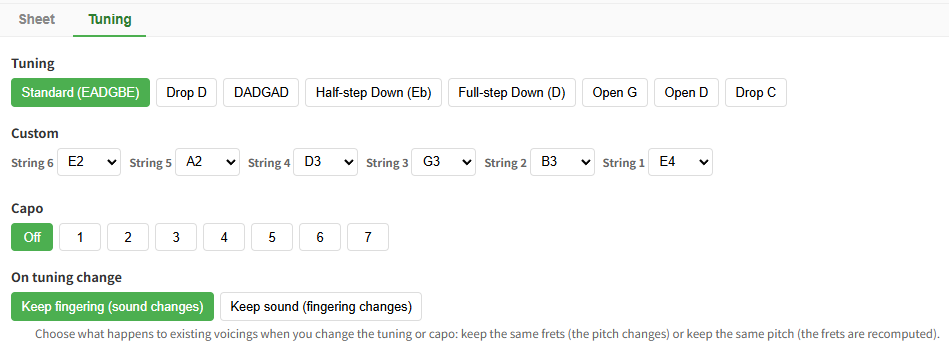
Open the Tuning tab in the settings panel and pick whatever fits the song.
- Presets: Drop D / DADGAD / half-step down / full-step down / Open G / Open D / Drop C
- Custom tuning: set the open-string note for each string individually
- Capo: choose the fret position (guitar)
Shown on the score, the way TAB does it
Your tuning and capo aren’t just kept in your head — they’re shown on the score following TAB convention.
- For non-standard tunings, each open-string note letter is stacked at the left of the first TAB staff
- A capo appears as a “Capo N” annotation in the top-left
This shows up in the editor, the shared link view, and the printed PDF, so whoever receives the sheet immediately knows which tuning to read it in.
Choose what happens when you retune
When you change tuning partway through, what should happen to the notes you’ve already entered? notave gives you two modes:
- Keep fingering: the fretted positions stay put, and only the pitch that sounds changes (great for trying out how a part rings in a new tuning)
- Keep sound: each note’s pitch is preserved and the fret is recomputed (great for replaying the same phrase in a different tuning; notes that fall out of range relocate to the nearest playable string)
Switch between “try the sound” and “rework the fingering” depending on what you’re after.
It carries through in share links too
Tuning and capo are stored inside the share link. Recipients view your sheet with exactly the tuning display you set — no login, no install. It’s also backward compatible with older share links, so sheets you made earlier won’t break.
Wrap-up
notave supports alternate tunings like Drop D and DADGAD, per-string custom tunings, and capo — and reflects those settings on the score and in share links.
When you want to capture a song that uses an alternate tuning or capo, all in your browser, give it a try at notave.zelva.dev. No install required — you can start right away.
For creating bass TAB, see the bass support article. For the basics, check the TAB creation guide.